
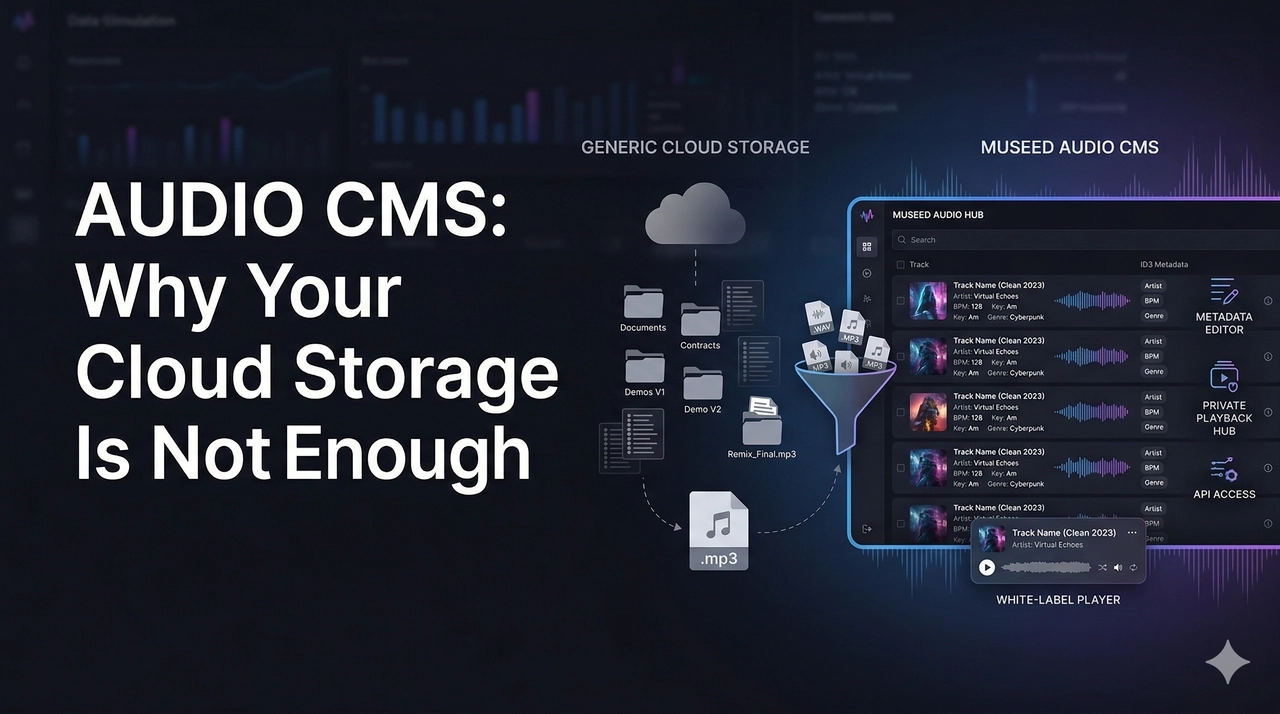
You have thousands of audio files in cloud storage. A collaborator asks for the clean version of a specific track, the 2023 one, not the remix. You know it exists. You scroll, open folders inside folders, download a file to check. Wrong one. Download another.
This is not a storage problem. This is what happens when you run an audio catalog on tools built for documents.
What Is an Audio CMS?
WordPress manages articles. Shopify manages products. The point of a CMS is not storage. It is control: organizing, updating, and searching your content without digging through raw files.
Audio has never had a proper version of this.
Every properly tagged audio file has metadata baked in: track title, artist, album, genre, bitrate, BPM, artwork. It lives inside the file as ID3 data. An Audio CMS reads it, surfaces it, lets you edit it, and organizes your catalog automatically.
That is the difference between storing audio and actually managing it.
Why Generic Cloud Storage Fails
Google Drive and Dropbox: Wrong Tool for Audio
Open a folder with 200 tracks in Google Drive. You see filenames, file sizes, upload dates. The artist name, album, genre, and bitrate embedded in each file are completely invisible. No filtering, no searching by metadata, no catalog structure.
Dropbox previews audio one file at a time with no playlist logic. And a known limitation: Dropbox converts audio to MP3 when playing through the browser, regardless of the original format. Your lossless files get degraded the moment a collaborator hits play.
Both tools solve "where did I put that document." Neither solves "how do I manage a catalog."
Cloud Object Storage: Powerful, But Empty
Services like AWS S3 or Cloudflare R2 power Spotify and Netflix. Fast, cheap, built for any volume. Think of them as an enormous warehouse: you can store and retrieve anything reliably, but there are no shelves, no labels, no organization. It just holds what you put in.
For a developer building a product from scratch, that flexibility is the point. For everyone else, it means months of custom work before you can do anything useful with your content.
Most people never build it. They just live with the chaos.
Who Needs an Audio CMS
🎙️ Internet Radio Stations
Tracks need rotation rules. Some songs play mornings only. Some artists should never play back to back. New additions need correct tags before entering rotation, or they end up in the wrong slot at the wrong time. Managing all of that in a spreadsheet cross-referenced with a cloud folder turns twenty minutes of work into four hours.
🎵 Sample Pack Stores and Audio E-commerce
A store with tens of thousands of samples needs buyers to search by key, tempo, and genre. After purchase, those samples need to live in a real, organized library, not a zip file. Delivering that from a generic storage bucket requires months of custom development. An Audio CMS makes it the default.
🏷️ Record Labels and Music Producers
A constant flow of demos, unreleased tracks, and reference files needs to reach A&Rs, sync agents, and collaborators. Each share controlled. Each listen logged. The experience on the other end should feel like a professional presentation, not a shared folder.
🎧 Podcasters and Premium Audio Creators
Spotify and Apple Podcasts are discovery tools. They are not built for gated content, private episode libraries, or subscriber-only access. A dedicated Audio CMS fills exactly that gap: your episodes, your subscribers, your terms.
📚 Audiobook Publishers and Voice Content Creators
Whether you are publishing narrated books, guided meditations, or hypnosis sessions, your listeners expect a clean, organized experience. An Audio CMS lets you structure chapters, manage series, and deliver content in a way that feels intentional rather than improvised.
🧘 Coaches, Course Creators, and Educators
If you sell audio courses, coaching programs, or any kind of learning content, you know how painful the post-purchase experience usually is: a zip file, a Dropbox link, or a half-working download page. An Audio CMS gives your buyers a real library they can return to, organized by module, session, or topic, under your brand.
📱 Developers and Mobile App Builders
Building an audio product? You need a structured backend with a real API, not a bucket of files with manual URL management and zero metadata logic. The Audio CMS becomes your engine. You build the experience on top.
Start a free trial on Museed and have your catalog organized today.
What a Real Audio CMS Does
Reads your files on upload. Artist, album, genre, bitrate, artwork, all surfaced automatically from your ID3 tags. No manual data entry, no renaming files.
Gives you full metadata control. Correct a title. Update artwork. Add BPM tags retroactively. Changes apply instantly across your entire catalog. The alternative is editing ID3 tags file by file in a desktop app and re-uploading everything. It is exactly as painful as it sounds.
Controls who hears what. Set access per track or per collection: public, private, password-protected, or shared with specific people. Change it anytime without touching the files.
Delivers a branded experience to your audience. When a fan, client, or subscriber accesses your content, they land on your domain, your logo, your colors. A clean private platform that reflects the quality of what is inside. Not a storage link. Not someone else's interface. A white-label streaming experience that carries your name from the URL to the player.
This last point matters more than it might seem. Managing your catalog privately and delivering it beautifully to your audience are two sides of the same coin. If you are thinking about what that public-facing experience looks like, we covered it in depth in How to Create Your Own Private Music Streaming App.
Museed: Audio CMS Built for Serious Creators
Museed is that infrastructure layer. The one most audio businesses have been improvising around for years, now built as an actual product.
Upload directly or connect your existing cloud storage. Museed reads your metadata, organizes your library, and gives you a single interface to manage everything in real time: ID3 tags, artwork, bitrate, collections, and access permissions. Your audience gets a fully white-label platform at your own domain with no Museed branding anywhere.
For developers, Museed exposes a complete API. Your catalog logic, metadata layer, and access control all live in Museed. Your app calls the API and serves content exactly the way your product needs it.
Try Museed free for 7 days. No credit card required.
FAQ
What is an Audio CMS? A content management system built specifically for audio. It reads the metadata inside your files, organizes your catalog automatically, lets you edit and manage everything from one place, controls who has access, and delivers your content through a branded platform your audience actually interacts with.
Do I need to be technical to use Museed? No. Museed is built for producers, labels, radio operators, coaches, and creators who want professional results without writing code. Developers who want deeper control get full API access.
I already have files in cloud storage. Do I need to re-upload everything? No. Museed connects to existing storage buckets so your catalog comes in without starting from scratch.
Can I use Museed alongside Spotify or Apple Music? Yes. Spotify handles public discovery. Museed handles the private layer: internal catalogs, unreleased content, subscriber libraries, course content, and anything that needs real management rather than public distribution. The two work well together.
Is Museed only for music? No. Podcast episodes, sample packs, audiobooks, coaching programs, course modules, radio archives, meditation audio, demos. If it is audio, Museed manages it.
Your Catalog Has Earned Better Infrastructure
A file is not a track. A folder is not a catalog. And cloud storage is not a CMS.
👉 Start your free trial on Museed
Get your catalog organized. Give your audience a home for it.